Choose Macrows when
Your spreadsheet has become a private business system.
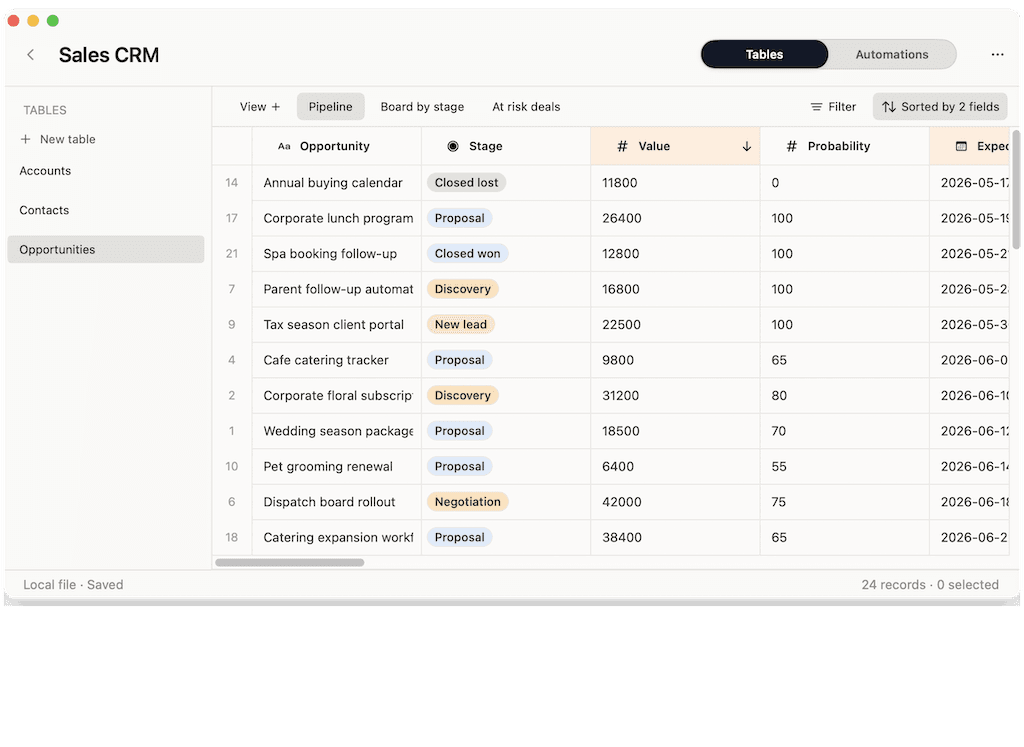
You need linked records, fields, views, formulas, imports, exports, and row actions, but you still want the speed and privacy of a native Mac app.
Airtable alternative for Mac
Private spreadsheet database for Mac, or cloud app builder? Airtable is powerful when a team needs a shared cloud workspace. Macrows is better when you want Airtable-style structure in a fast, private Mac spreadsheet first.
Choose Macrows when
You need linked records, fields, views, formulas, imports, exports, and row actions, but you still want the speed and privacy of a native Mac app.
Choose Airtable when
You need interfaces, forms, portals, always-on automations, permissions, integrations, reporting, and governance across a larger team.
Quick verdict
Airtable is a strong cloud platform. Macrows is the better answer when the workflow still needs to feel like a spreadsheet, run fast on Mac, and stay local until sharing is worth it.
Pick Macrows if
Client lists, research data, project trackers, inventory sheets, and lead lists are often too important for a loose sheet, but too personal for a full cloud workspace.
Pick Airtable if
Airtable is the safer choice when you need interfaces, portals, real-time browser collaboration, mature automations, permissions, reporting, and admin controls today.
The honest answer
Keep Airtable for shared operations that depend on cloud collaboration. Move the private, Mac-first parts of the workflow to Macrows when speed and local ownership matter more.
Why Macrows can be better
Macrows wins when the problem is not building an internal app for the company. It wins when the problem is a spreadsheet that now runs part of your work and needs to be cleaner, faster, and private.
Macrows keeps rows, columns, formulas, paste, import, and export close to the surface. You can clean a CSV, update a client list, or fix a project tracker without first designing an app.
Use fields, views, linked records, lookups, and row actions when a flat sheet stops being enough. Keep the sheet feel, but stop relying on fragile tabs and manual follow-ups.
Macrows is built for people who want a useful local Mac app before they create an account, invite a workspace, or upload sensitive client, research, or operations data.
Airtable is excellent for larger cloud workflows. Macrows is sharper when one person or a small Mac-based team needs a fast private CRM, tracker, database, or operating sheet.
Feature comparison
The short version: Airtable is broader. Macrows is more focused. That focus matters when your best workflow still starts in a sheet.
| Category | Macrows | Airtable |
|---|---|---|
| Best starting point | A spreadsheet that can grow into a structured local database for CRM, projects, inventory, research, and operations. | A cloud app-building workspace for teams that want shared data, interfaces, forms, automations, and governance. |
| Mac experience | Native Mac app with local projects, fast editing, keyboard-friendly grid work, and no browser tab required. | Cloud-first workspace with web, desktop, and mobile access for teams working from the same shared base. |
| Privacy model | Local work stays on your Mac until you choose connected features. No login is required for local projects. | Data lives in Airtable's cloud workspace so collaborators, automations, interfaces, and admin controls can run centrally. |
| Spreadsheet feel | Keeps sheet basics close: rows, columns, formulas, copy/paste, CSV import, and Excel export. | Uses a database-like grid, but the product is increasingly centered on apps, interfaces, agents, and team workflows. |
| Structure | Projects, tables, fields, records, saved views, linked records, lookups, formulas, and row actions. | Bases, relational tables, views, forms, interfaces, portals, reporting, sync, automations, and AI app building. |
| Automations | Simple row actions today, with advanced automations, API actions, hosted runs, and local AI as the product grows. | Mature no-code automations, integrations, scripts, AI fields, Field Agents, and workspace-level automation management. |
| Pricing fit | Free for local use. Paid plans are planned for advanced automations, API connections, sharing, sync, and AI features. | Free plan for lightweight needs, then per-seat paid plans for more capacity, team features, and enterprise controls. |
| Choose it when | You want an Airtable-style database that feels like a fast private Mac spreadsheet first. | You need a shared cloud platform with interfaces, permissions, automations, integrations, and enterprise governance. |
Detailed comparison
Airtable is strongest when the work belongs in a shared cloud workspace. That is the right answer for cross-functional teams, permissions, dashboards, portals, and always-on automations. Macrows is better when the first job is personal or private: a lead list, client tracker, research database, content calendar, or operations sheet that should live on your Mac before it becomes a shared system.
Airtable can become a polished internal app. That also means more setup decisions: bases, interfaces, collaborators, permissions, automation runs, and plan limits. Macrows keeps the first step simpler. Import a CSV, edit like a sheet, add fields and views when needed, then add actions when a repeated task becomes painful.
Macrows is not trying to be a cheaper Airtable clone. It is for the jobs that sit between Google Sheets and Airtable: client follow-ups, project status, inventory, research notes, source lists, lead enrichment, and small internal tools. The work needs more than a spreadsheet, but not always a cloud platform.
Choose Airtable if you already need real-time browser collaboration, mature app interfaces, enterprise administration, or a large automation library today. Choose Macrows if you want to keep the work fast, private, local, and Mac-native first, then add more structure as the spreadsheet becomes important.
Best use cases
Track clients, deals, next actions, notes, and follow-ups from a local Mac database instead of a browser workspace.
Import sources, clean fields, link notes, tag records, and keep sensitive research data on your own machine.
Turn a status spreadsheet into linked records, saved views, deadlines, owners, and row actions.
Connect products, vendors, locations, reorder status, and exportable data without building a full team app.
Use Airtable when external collaborators need browser access, forms, portals, permissions, and shared interfaces.
Use Airtable when the priority is admin controls, governance, large-team collaboration, and mature cloud automation.
Pricing and ownership
For a solo Mac user, that difference matters. You can start building a useful local Macrows base without turning the work into an account, workspace, and paid collaboration setup.
| Topic | Macrows | Airtable |
|---|---|---|
| Trying the product | Local use is free and does not require a login. | Free plan is available for lightweight needs. |
| Growing usage | Paid plans are planned for advanced automations, API connections, sharing, sync, and premium AI. | Team is listed at $20 per user/month when billed annually, and Business at $45 per user/month when billed annually. |
| Team scale | Best today for solo operators and small Mac-heavy teams that want local ownership first. | Business and Enterprise Scale add more capacity, administration, governance, and sales-led options. |
Airtable pricing and feature notes were reviewed in May 2026 from Airtable pricing, Airtable plans overview, Airtable platform.
Switching from Airtable
You do not have to replace every Airtable base at once. Start with the workflows that are really personal, private, or too small to justify a full cloud app.
FAQ
Yes, for a specific kind of Airtable user. Macrows is a good Airtable alternative for Mac users who want a private, local, spreadsheet-first database for CRM, projects, research, inventory, or small operations. Airtable is still better for large cloud workspaces, real-time collaboration, interfaces, and enterprise governance.
Choose Macrows when you want native Mac speed, no-login local use, local data ownership, spreadsheet-style editing, and enough structure to turn a sheet into a working system. It is built for people who do not want every small database to become a cloud workspace.
Choose Airtable when you need mature shared workspaces, forms, interfaces, portals, integrations, no-code automations, admin controls, or enterprise scale today. Airtable is a broader cloud app-building platform.
Macrows can replace Airtable for a personal CRM, client tracker, lead list, or small private CRM that mostly lives on one Mac. Airtable is better when the CRM needs many collaborators, browser access, customer portals, complex permissions, or always-on cloud automations.
Macrows is a local Mac app for local projects, so private spreadsheet database work starts on your Mac without requiring a login. Connected features such as sharing, sync, hosted automations, and API workflows can be added when a workflow needs them.
Macrows is free for local use. Paid Macrows plans are planned for advanced automations, API connections, sharing, sync, and premium AI features. Airtable has a free plan for lightweight needs and paid per-seat plans when teams need more capacity and collaboration features.
Bottom line
Build a private spreadsheet database on your Mac. Start with a familiar grid. Add structure when the work earns it.