The right database app for Mac depends on the kind of work you are trying to organize. A personal CRM, project tracker, inventory list, and research database usually need a structured working database, not a developer database engine or a full custom app build.
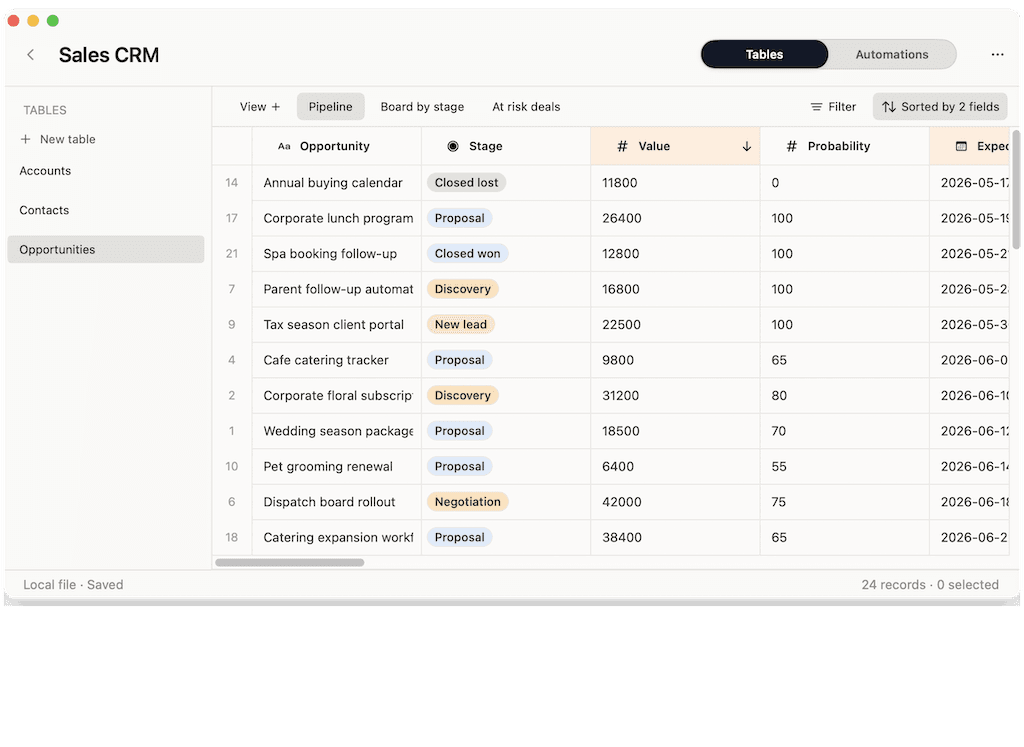
Macrows fits the middle category. It is a private spreadsheet database for Mac: familiar rows and columns with fields, saved views, linked records, formulas, buttons, row actions, and local projects.
If you are comparing the broader software category first, start with the top-level Database Software for Mac hub. This article focuses on the app-type decision: spreadsheet, spreadsheet database, custom app builder, or developer database.
Private database for Mac
A private database for Mac makes sense when the first working copy should stay on your computer instead of starting in a shared cloud workspace. Use it for a personal CRM, project tracker, inventory list, client database, or research database when the workflow still needs a grid but has outgrown a flat spreadsheet.
Macrows is built for that private middle ground: local Mac projects first, sharing only when you choose it, and enough database structure to make repeated work easier to review.
Database app vs database software on Mac
A database app is usually the user-facing tool you open to organize records. Database software is the broader category. It can include spreadsheet databases, app builders, cloud database tools, SQL clients, and developer database engines.
That distinction helps because "database software for Mac" can mean several different jobs.
| Search intent | Usually means | Good fit |
|---|---|---|
| Database app for Mac | A practical app for organizing records | Macrows, FileMaker, Airtable-style tools |
| Database software for Mac | The broader category of database tools | Category hub, comparison, buyer guide |
| Mac database software | Mac-first database workflow or technical database tool | Macrows for workflows, SQL tools for developers |
| Best database software for Mac | A buyer decision across app types | Compare spreadsheets, Macrows, Airtable, FileMaker, and SQL tools |
Use the phrase that matches the job. A founder cleaning a customer sheet needs a different answer than a developer inspecting production tables.
The four types of Mac database apps
Not every database app is trying to do the same job.
| Type | Best for | Watch out for |
|---|---|---|
| Spreadsheet | Budgets, analysis, simple tables, one-off lists | Weak relationships and repeated workflows |
| Spreadsheet database | CRM, projects, inventory, research, operations | Not meant to replace a custom app for every case |
| Custom app builder | Internal apps, custom layouts, scripts, deployment | More setup than many personal workflows need |
| Developer database tool | SQL, app development, server data, queries | Too technical for most everyday trackers |
This split prevents a common mistake. A person searching for a database app may not want a database engine. They may want a better way to organize work that has outgrown a spreadsheet.
Why spreadsheets are often the starting point
Spreadsheets are fast because they do not ask for structure first. You can paste a CSV, add columns, filter rows, and get moving.
That flexibility becomes a problem when the sheet starts running the work. Status values drift. People copy rows into new tabs. Related data repeats. Follow-ups depend on memory. Reports require manual cleanup.
A spreadsheet database keeps the speed of the grid, but treats rows as records and columns as fields. That makes it a better fit for recurring business workflows.
Where FileMaker and Airtable fit
FileMaker is a better fit when the goal is a custom app. Claris describes FileMaker Pro as a development tool for creating custom apps that work across iPad, iPhone, Windows, Mac, and the web: Claris FileMaker Pro installation guide.
Airtable is a better fit when the work belongs in a shared cloud base. Airtable's docs describe workspaces, bases, tables, fields, views, collaborators, and permissions: Airtable basics.
Macrows is for a different starting point. It is for Mac users whose work begins as a spreadsheet and needs database structure before it needs a shared app.
What to look for in a Mac database app
Use this checklist before choosing.
| Requirement | Why it matters |
|---|---|
| Native Mac workflow | Daily work is easier when the database feels close to the rest of your Mac. |
| Field types | Select, date, link, formula, and button fields make data cleaner. |
| Saved views | One table can answer several questions without copied tabs. |
| Linked records | Contacts, companies, projects, tasks, products, and vendors can stay connected. |
| Import and export | You should be able to bring in CSV data and leave with usable data. |
| Honest sharing model | Private work and shared work need different defaults. |
If the app cannot explain where it fits, the decision will be harder later.
Example workflows by user
| User | Database they need | Useful tables |
|---|---|---|
| Consultant | Client and project tracker | Clients, Contacts, Projects, Activities |
| Founder | Early customer CRM | Contacts, Companies, Deals, Notes |
| Operations lead | Inventory tracker | Products, Vendors, Locations, Stock changes |
| Researcher | Source database | Sources, Notes, Topics, Follow-ups |
These workflows need structure, but they do not always need a full app build. They need a database that still feels practical.
How Macrows fits
Macrows is a private spreadsheet database for Mac. It sits between a normal spreadsheet and a full custom database app.
Use Macrows when you want to:
- Start from a familiar grid rather than a blank app canvas.
- Turn messy spreadsheets into tables with fields and saved views.
- Link records across CRM, project, inventory, and research workflows.
- Keep local projects private on your Mac.
- Add row actions where repeated work happens.
For a broader software comparison, read Database Software for Mac. For a deeper explanation of this category, read Spreadsheet Database for Mac. If you miss the old personal database style, read Bento Replacement for Mac.
When Macrows is not the right database app
Use another tool when you need a developer database, SQL queries, server administration, advanced app scripting, custom layouts, or a large multi-user deployment.
Use another tool when the work is only a simple list. A database adds value when records need fields, views, relationships, and repeated actions. It is unnecessary when a plain table is enough.
Macrows is strongest for private Mac workflows that started in spreadsheets and now need more structure: CRM, projects, inventory, research, content planning, and lead cleanup.
FAQ
What is the best database app for Mac?
The best database app for Mac depends on the job. Use a spreadsheet for simple tables, a spreadsheet database for working systems, FileMaker for custom apps, and developer tools for SQL or app data.
What is a simple database app for Mac?
A simple database app for Mac lets you create tables, fields, views, and relationships without designing a full application. That is the category Macrows focuses on.
What is database software for Mac?
Database software for Mac is the broader category of tools used to store, structure, search, and work with records on macOS. It can include spreadsheet databases, custom app builders, cloud databases, and developer database tools.
Is a spreadsheet a database app?
A spreadsheet can act like a light database for simple lists. It becomes weak when data needs linked records, controlled field values, saved views, and repeated actions.
Is Macrows a database app for Mac?
Yes. Macrows is a private spreadsheet database for Mac. It is built for spreadsheet-based workflows that need fields, views, linked records, formulas, buttons, and row actions.
When should I use a custom app builder instead?
Use a custom app builder when you need custom screens, complex rules, advanced scripts, permissions, hosted access, or a database that many people operate together.