The best inventory tracker for Mac keeps products, vendors, locations, stock status, and reorders in one structured system. A simple inventory spreadsheet is enough at first, but it breaks when stock moves across places, suppliers change, and reorder decisions need reliable views.
Macrows fits when the inventory list should stay private and Mac-native while gaining database structure. It gives you a familiar grid with fields, saved views, linked records, formulas, buttons, and row actions.
Why inventory spreadsheets break
Inventory spreadsheets fail when one row has to carry too many jobs. A product row may include vendor contact details, current stock, storage location, reorder notes, cost, movement history, and purchase plans.
That is fine for a short list. It becomes unreliable when products move, vendors change, and reorder decisions depend on filtered views. People copy rows, overwrite old values, or miss low-stock items because the sheet is not built around action.
An inventory tracker should separate the record types and show the right view at the right time.
Inventory software for Mac vs an inventory tracker
Searching for inventory software for Mac can mean a few different jobs. A small shop may need a better product and vendor list. A warehouse may need barcode scanning, purchase controls, point-of-sale updates, and accounting links.
Use this split before choosing.
| Need | Inventory tracker in Macrows | Dedicated inventory software |
|---|---|---|
| Products, vendors, locations | Strong fit | Strong fit |
| Low-stock and reorder views | Strong fit | Strong fit |
| Private Mac working database | Strong fit | Depends on the tool |
| Barcode scanning | Limited fit | Strong fit |
| Point-of-sale and accounting links | Limited fit | Strong fit |
| Warehouse controls | Limited fit | Strong fit |
Macrows is a good fit when inventory is still a structured working list. Dedicated inventory management software is better when stock movement is tied to sales channels, warehouses, scanners, shipping, or accounting.
Inventory tracker schema
Start with five tables. Add more only when the workflow needs it.
| Table | Core fields |
|---|---|
| Products | SKU, product name, category, vendor, location, stock level, reorder point |
| Vendors | Vendor, contact, website, lead time, minimum order, notes |
| Locations | Location, type, address, responsible person, notes |
| Stock changes | Product, date, change type, quantity, reason, location |
| Purchase orders | Vendor, products, order date, expected date, status, notes |
This structure keeps vendor and location details from being repeated across product rows. It also gives you a place to track movement history when current stock alone is not enough.
Views that prevent inventory drift
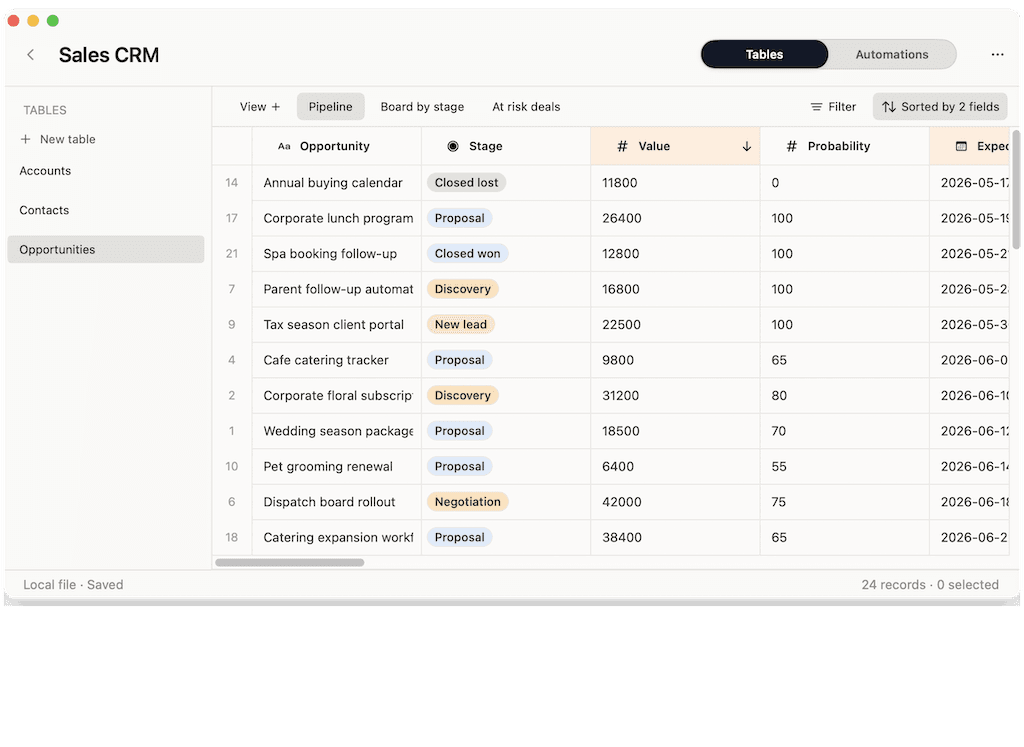
Views should help you act before a stock issue becomes urgent.
| View | Shows | Use it for |
|---|---|---|
| Low stock | Products at or below reorder point | Reorder planning |
| Reorder needed | Items ready for a purchase note | Supplier outreach |
| By vendor | Products grouped by supplier | Batch ordering |
| By location | Products grouped by storage place | Physical checks |
| Recently changed | Stock changes from the last review window | Audit and cleanup |
A view is more useful than another copied tab. It keeps the same records visible through different questions.
Row actions for inventory work
Inventory work has repeated actions. Put those actions next to the product or order.
| Action | Where it belongs | Result |
|---|---|---|
| Prepare reorder note | Product row | Drafts vendor, SKU, stock level, and needed quantity. |
| Mark received | Purchase order row | Updates status and prompts for stock change. |
| Flag stock issue | Product row | Marks damaged, missing, or disputed items for review. |
| Create stock check | Location row | Prepares a short checklist for that place. |
Start with the actions that remove repeated typing. Do not build complex inventory automation before the table structure is clear.
How Macrows fits
Macrows is a private spreadsheet database for Mac. It is a good fit for small inventory workflows that need more structure than a spreadsheet but do not need a full operations system.
Use Macrows when you want to:
- Build product, vendor, location, stock change, and purchase tables from a grid.
- Use fields for category, status, date, stock level, reorder point, and supplier.
- Link products to vendors and locations.
- Save views for low stock, reorder needed, by vendor, and by location.
- Add row actions for reorder notes, stock checks, and purchase updates.
For the broader category, read Spreadsheet Database for Mac. If you are comparing Mac database software first, read Database Software for Mac. If you are choosing a Mac database app, read Database App for Mac. For deadline-based operations, read Project Tracker for Mac.
When Macrows is not the right inventory tracker
Use another tool when inventory is tied to barcode scanning, warehouse systems, accounting, point-of-sale checkout, shipping labels, or formal purchasing controls.
Dedicated commerce tools are better when inventory is tied directly to sales channels. Shopify documents inventory tracking, stock levels, adjustments, transfers, purchase orders, and low-stock workflows: Shopify inventory management. Square describes inventory tracking connected to point-of-sale activity: Square inventory tracking.
Use another tool when several staff members need live shared updates from different devices all day. A dedicated inventory app may be better when stock movement is constant and business-critical.
Macrows is strongest for small Mac-based workflows: products, vendors, locations, stock status, reorder planning, and cleanup of existing inventory spreadsheets.
Setup checklist
Use this order to avoid overbuilding.
- Import or paste the product list.
- Clean product names, categories, and SKU values.
- Split vendors and locations into their own tables.
- Add stock level and reorder point fields.
- Create low-stock and reorder-needed views.
- Add stock changes only when history matters.
- Add row actions after the manual reorder process is clear.
The best inventory tracker is the one that catches a reorder before the shortage becomes a customer problem.
FAQ
What should an inventory tracker for Mac include?
An inventory tracker for Mac should include products, vendors, locations, stock level, reorder point, purchase status, and saved views for low stock and reorder work.
Can I track inventory in a spreadsheet?
Yes, for a small and stable list. A spreadsheet gets weaker when products connect to vendors, locations, purchase notes, stock movement, and repeated reorder decisions.
Is Macrows good for inventory tracking?
Macrows is a good fit for private Mac inventory workflows that need a grid, fields, linked records, saved views, formulas, buttons, and row actions.
When should I use inventory software instead?
Use dedicated inventory software when you need barcode scanning, warehouse control, point-of-sale integration, accounting links, shipping workflows, or constant shared updates.
What is the best inventory software for Mac?
The best inventory software for Mac depends on the workflow. Use Macrows for a private product, vendor, location, and reorder database. Use a dedicated inventory app for barcode, warehouse, sales, shipping, and accounting workflows.
Can Macrows replace inventory management software?
Macrows can replace a spreadsheet-based inventory tracker for many small workflows. It should not replace dedicated inventory management software when stock is tied to scanners, checkout, warehouses, or accounting.
What should I build first?
Start with Products, Vendors, and Locations. Add Stock changes and Purchase orders after the basic low-stock and reorder views are useful.