Best fit
Use Macrows when the workflow starts as a spreadsheet.
Macrows is for CRM, project, inventory, research, and client systems that need records, fields, views, links, actions, and a private Mac starting point.
Mac database software
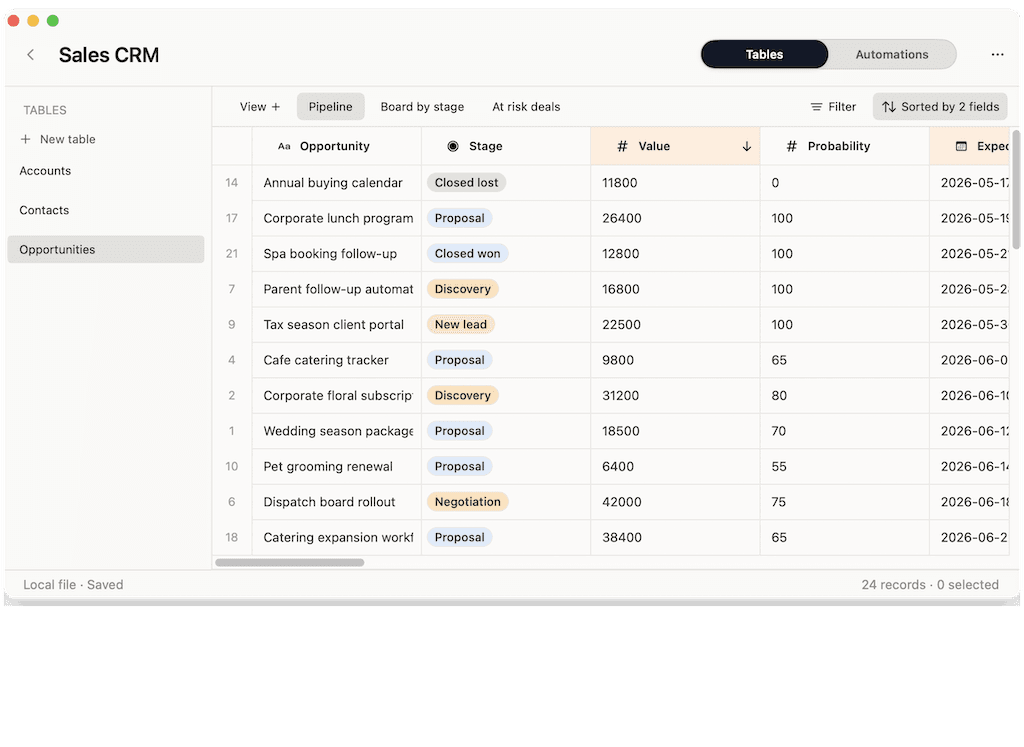
Macrows turns spreadsheets into private Mac databases for CRM, projects, inventory, and research. Start from a familiar grid, then add fields, saved views, linked records, row actions, and local AI.
What to choose
Most Mac users searching for database software do not need a database engine first. They need a clear home for records, views, relationships, and repeatable workflows.
Best fit
Macrows is for CRM, project, inventory, research, and client systems that need records, fields, views, links, actions, and a private Mac starting point.
Better elsewhere
FileMaker, Airtable, SQL tools, and dedicated inventory or CRM software are better when custom apps, admin controls, integrations, or constant shared access are the main job.
The right answer changes when the job is a spreadsheet-like working system, a shared cloud base, a custom app, or a developer database.
| Option | Best for | Watch for |
|---|---|---|
| Spreadsheet | Budgets, models, one-off lists, and quick CSV cleanup. | Relationships, repeat views, follow-ups, and status rules usually become fragile. |
| Macrows | Private Mac databases for CRM, projects, inventory, research, and small operations. | Not the first choice for large shared portals, barcode-heavy warehouses, or custom enterprise apps. |
| Airtable | Shared cloud bases, forms, interfaces, permissions, and team workflows. | Browser and workspace setup can be heavy when the work should start private on one Mac. |
| FileMaker | Custom database applications with layouts, scripts, deployment, and mature business logic. | More app-building weight than many spreadsheet-style workflows need. |
| Developer database | SQL, application data, server work, migrations, queries, and technical data inspection. | Too technical for everyday CRM, inventory, project, and research trackers. |
A useful Mac database should keep the speed of a spreadsheet while adding enough structure to make recurring work reliable.
The first step should feel close to the spreadsheets people already use, so importing, pasting, sorting, and editing stay fast.
Selects, dates, numbers, links, formulas, and buttons keep records cleaner than loose text columns.
One table should answer several questions: follow-ups due, low stock, overdue projects, warm leads, or sources that need review.
Contacts can connect to companies, products to vendors, tasks to projects, and research notes to sources without copy-pasted tabs.
Not every database needs to start as a shared cloud workspace. Some work should begin privately on the Mac.
Repeated work is easier when follow-ups, summaries, status changes, and cleanup steps live next to the row they affect.
Macrows is strongest when a spreadsheet has become a working system and needs structure without becoming a full custom app.
Track people, companies, notes, deals, and follow-ups without forcing a personal relationship workflow into a full sales CRM.
Keep products, vendors, locations, stock levels, reorder points, and purchase notes in a structured grid.
Turn task and deadline spreadsheets into records with owners, statuses, risks, handoffs, and saved review views.
Organize sources, notes, claims, people, topics, and review status in a private Mac database.
Compare simple spreadsheets, spreadsheet databases, custom app builders, and developer database tools.
Choose Airtable for shared cloud bases and Macrows when the first copy should start privately on your Mac.
Use these answers to decide whether you need Macrows, a spreadsheet, a cloud database, a custom app builder, or a technical database tool.
The best database software for Mac depends on the workflow. Macrows fits private spreadsheet databases, FileMaker fits custom apps, Airtable fits shared cloud bases, and developer tools fit SQL or application data.
Yes. Macrows is database software for Mac users who want to turn spreadsheets into structured systems for CRM, projects, inventory, research, and operations.
A database app usually means a user-facing tool for organizing work. Database software is broader and can include app builders, cloud database tools, SQL clients, and spreadsheet databases.
Yes. A Mac database can work well for a personal CRM or lightweight client tracker when it has fields, linked records, saved views, and follow-up workflows.
Yes, for small inventory workflows that need products, vendors, locations, stock levels, reorder points, and purchase notes. Use dedicated inventory software for barcode, warehouse, shipping, accounting, or point-of-sale needs.
A spreadsheet is enough for simple lists, budgets, and one-off analysis. Move to database software when records need relationships, controlled fields, saved views, and repeated actions.
Start with one real spreadsheet
Bring in a CRM, inventory list, project tracker, or research sheet, then add the structure that makes it easier to run.