The best personal CRM for Mac is a simple system for contacts, companies, notes, deals, and follow-ups. It should help you remember who matters, what happened last, and what to do next without forcing a solo workflow into a heavy sales tool.
Macrows fits when your CRM starts as a spreadsheet but now needs fields, saved views, linked records, formulas, buttons, and row actions. It is a private spreadsheet database for Mac, so the relationship data can start local before you decide what should be shared.
This page owns the finished personal CRM setup: the tables, views, and weekly review habit. If you already have a messy contact sheet and need the migration steps, use the separate turn a spreadsheet into a CRM guide.
Why personal CRM spreadsheets break
A contact spreadsheet usually works at first. You add names, emails, a status, maybe a note. Then the sheet becomes memory for important relationships.
That is when it starts to fail. Follow-up dates hide in notes. Status labels drift. One person appears in several tabs. Deals, meetings, and next actions sit in the same row, so the history becomes hard to scan.
The fix is not always a full sales CRM. Many solo operators, consultants, founders, and creators need a private relationship database with better structure.
CRM on Mac: when a personal CRM is enough
Searching for CRM on Mac can lead to two different answers. Some people need a full sales CRM for a team. Others need a personal Mac CRM that keeps contacts, companies, notes, deals, and follow-ups in one private working system.
Use this split before choosing.
| Need | Personal CRM on Mac | Full CRM |
|---|---|---|
| Relationship memory | Strong fit | Strong fit |
| Solo follow-up discipline | Strong fit | Often heavier than needed |
| Team pipeline reporting | Limited fit | Strong fit |
| Email campaigns and support workflows | Limited fit | Strong fit |
| Private local starting point | Strong fit in Macrows | Usually cloud-first |
The best CRM for Mac users is the one that matches the workflow size. A solo consultant does not need the same system as a sales team with territories, reporting, call logging, and admin controls.
Personal CRM schema
Use four tables. This keeps the CRM clear without making it complicated.
| Table | Core fields |
|---|---|
| Contacts | Name, email, company, role, relationship type, status, last contact, next action |
| Companies | Company, website, industry, priority, notes |
| Deals | Contact, company, value, stage, close date, next step |
| Activities | Contact, date, channel, notes, follow-up date |
The key is separation. A contact is not a deal. A meeting note is not a contact. A company is not just text copied into every row.
Views that make the CRM useful
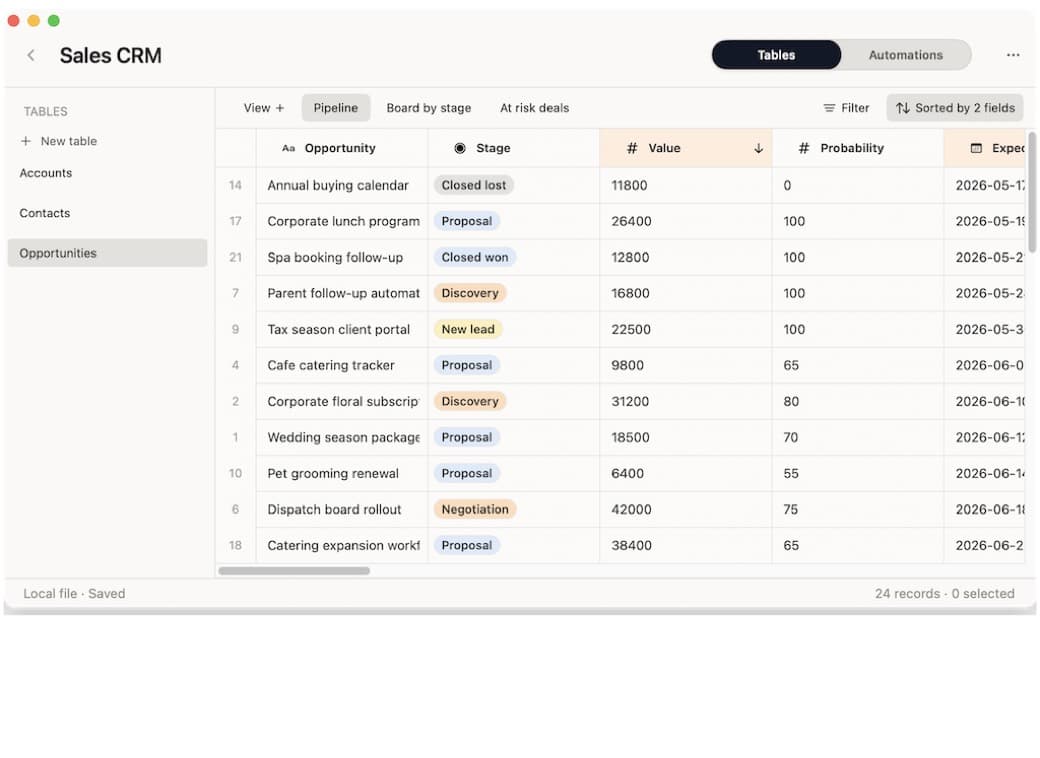
Views should answer daily questions. If a view does not change what you do, remove it.
| View | What it shows | Why it helps |
|---|---|---|
| Follow up today | Contacts or activities with a follow-up date due now | Turns the CRM into a work list. |
| Warm relationships | People with high priority and recent activity | Keeps valuable relationships visible. |
| Quiet contacts | Important people with no recent touch | Prevents slow relationship decay. |
| Active deals | Deals that are open and have a next step | Keeps opportunities from becoming notes. |
| New intros | Recently added people without a first follow-up | Makes first contact less ad hoc. |
Saved views are where a personal CRM becomes more useful than a flat spreadsheet. The same data can answer different questions without copying rows.
A weekly CRM workflow
Keep the habit small enough to repeat.
- Open the follow-up view.
- Handle every contact due today.
- Add a short activity note after each meaningful touch.
- Set the next action before leaving the record.
- Review quiet high-priority relationships once a week.
- Close or archive deals that no longer have a real next step.
The workflow matters more than the field list. A personal CRM works when it changes behavior.
How Macrows fits
Macrows is a good fit when your relationship system starts as a sheet but now needs more memory and structure.
Use Macrows when you want to:
- Import or paste a contact list into a familiar grid.
- Add real fields for status, dates, select values, formulas, and buttons.
- Link Contacts to Companies, Deals, and Activities.
- Create saved views for follow-ups, quiet relationships, and active deals.
- Run row actions such as draft follow-up, summarize notes, or create a next action.
For the category behind this setup, read Spreadsheet Database for Mac. If you are choosing the broader app type, read Database App for Mac. For the broader Mac software category, read Database Software for Mac.
When Macrows is not the right CRM
Use another tool when your CRM needs team sales reporting, territory management, lead routing, call logging, campaign attribution, or strict admin controls. Those jobs belong in a dedicated sales CRM.
For comparison, Apple Contacts is useful for address-book records, not a full follow-up workflow: Apple Contacts User Guide. Dedicated CRM tools such as HubSpot describe contact, company, deal, email, call, note, follow-up, and meeting workflows for teams: HubSpot contact management.
Use another tool when your main need is email marketing, customer support, invoicing, or shared account management. A personal CRM should not become the place where every customer process lives.
Macrows is strongest for private relationship tracking: people, notes, next actions, deals, and small workflows that still feel close to one Mac user.
Decision checklist
Choose a spreadsheet database CRM if most of these are true.
| Question | Yes means |
|---|---|
| Do I own the relationship workflow personally? | A private CRM is a good fit. |
| Do I mostly need memory and follow-up discipline? | Keep the system lightweight. |
| Do I need contacts linked to companies and activities? | A flat sheet is likely too weak. |
| Do I need sales team reporting? | A dedicated CRM may be better. |
| Do I want the first copy local on my Mac? | Macrows is worth considering. |
The right personal CRM is the one you will keep current. A complex setup that you avoid is worse than a simple one that you update every week.
FAQ
What is a personal CRM for Mac?
A personal CRM for Mac is a relationship database for contacts, notes, follow-ups, deals, and activities. It is usually lighter than a team sales CRM.
What is the best CRM for Mac users?
The best CRM for Mac users depends on scale. Use a personal CRM when one person owns the relationship workflow. Use a full CRM when a team needs shared reporting, routing, permissions, and sales operations.
Can I use Macrows as a CRM on Mac?
Yes. Macrows can work as a private CRM on Mac when you need contacts, companies, deals, activities, saved follow-up views, and row actions from a familiar grid.
Can I build a personal CRM from a spreadsheet?
Yes. Start with your contact list, then add tables for companies, deals, and activities. The important step is creating views for follow-ups and stale relationships.
What fields should a personal CRM include?
Start with name, email, company, relationship type, status, last contact, next action, and follow-up date. Add deal and activity tables only when you need them.
Is Macrows good for a personal CRM?
Yes. Macrows is a good fit when the CRM should stay private on your Mac and still feel close to a spreadsheet. Use a full CRM when shared reporting and sales operations are the main job.
When should I move to a full CRM?
Move to a full CRM when several people need shared sales workflows, reporting, permissions, call tracking, pipeline rules, or integrations that a personal database should not handle.