When your source spreadsheet has become the place where claims, notes, people, and follow-ups collide, the best research database for Mac is a private structured table system, not just a citation manager. Use Zotero for citations, DEVONthink for document archives, Airtable for shared team research, and Macrows when your working evidence should start as a private spreadsheet database for Mac.
Macrows fits the middle case: begin with a familiar grid, turn messy source columns into fields, link claims back to sources, and create views for unverified claims or sensitive records. Keep regulated study data in approved systems. For private market research, analyst work, journalism prep, founder research, or client discovery, a smaller table-first setup is often easier to maintain than a folder of PDFs plus a flat sheet.
What a research database is
A research database is a structured place to keep the working evidence behind a project. It should show what you found, where it came from, what it supports, how confident you are, and what needs review next.
That is different from a folder of PDFs. It is also different from a notes app. The database part matters when one source supports several claims, one person appears in several organizations, or one note creates three follow-up tasks.
For many Mac users, the starting point is a spreadsheet. That works for a small source list. It starts to fail when source names are copied across tabs, tags drift, confidence levels are typed five different ways, and key claims are buried inside long notes.
Why spreadsheets fail for research
Spreadsheets are useful for research because they are easy to start and easy to share as CSV files. The University of Wisconsin Research Data Services notes that many research tools output spreadsheet formats and that researchers use spreadsheets for both numeric and text data: Using Spreadsheets.
The same guidance warns that spreadsheet errors can hurt reproducibility and recommends practices such as keeping raw copies, using consistent terms, and keeping one worksheet per data set.
A separate Wisconsin guide explains the tradeoff directly: spreadsheets are easy to learn and flexible, but they give limited control over data integrity and format. It also notes that non-normalized spreadsheet structures can introduce errors: Spreadsheets and Databases as Tools for Data Management.
For a research workflow, the common problems are practical:
- The same source appears in several tabs with slightly different titles.
- Claims are stored as text notes instead of reviewable records.
- People, organizations, and sources are copied instead of linked.
- Tags and confidence ratings drift.
- Follow-ups live in memory, comments, or separate task lists.
- Sensitive records sit in whichever cloud sheet was easiest to open.
That is the point where a research spreadsheet should become a research database.
A useful research database schema
Start with the records you need to review, not the app you want to use. A good private research setup can begin with six tables.
| Table | Core fields | Useful views |
|---|---|---|
| Sources | Title, URL or file, author, type, date found, topic, status | New sources, cited, needs metadata |
| Notes | Source, summary, quote, tag, confidence, date captured | High-confidence notes, by topic, needs review |
| Claims | Claim, source, support level, confidence, owner, next check | Unverified claims, contradicted, ready to cite |
| People | Name, role, organization, source, notes | Experts, contacts, quoted people |
| Organizations | Name, type, website, people, source, notes | Vendors, institutions, competitors |
| Tasks | Related source, claim, owner, due date, status | Follow-up sources, due this week, blocked |
This schema keeps research from becoming a pile of text. A claim can link back to the source that supports it. A person can link to an organization. A task can point to the claim or source that needs work.
Start with Sources, Notes, Claims, and Tasks. Add People and Organizations only when names repeat enough to justify their own tables.
How to build it on a Mac
Build the database from the review questions you need to answer every week.
Step 1: Import a starter Sources table
Create a Sources table first. Add title, URL or file, author, source type, topic, date found, status, confidence, sensitivity, next action, and notes.
The starter CSV gives you realistic fictional rows to import and rename. It is only the first table, because a real research database becomes easier to trust when each table has one job.
Step 2: Add Notes and Claims
Add a Notes table for summaries, quotes, tags, and capture dates. Link each note to a source instead of repeating the source title.
Then add a Claims table. Track the claim, support level, confidence, and which source supports or challenges it. This is the difference between "I saw this somewhere" and a reviewable research trail.
Step 3: Add People, Organizations, and Tasks when they repeat
Do not build every table on day one. Add People and Organizations when names start appearing across multiple sources. Add Tasks when research creates follow-up work.
The first useful task views are simple: follow-up sources, due this week, blocked, and stale checks.
Step 4: Create saved views for review
Create saved views for unverified claims, sensitive records, high-confidence notes, missing metadata, follow-up sources, and stale tasks.
Step 5: Keep raw files outside the database when needed
Keep raw PDFs, transcripts, recordings, and exports in a stable folder or archive. Store links or file references in the database, then use the database for review status, claims, tags, and next actions.
This keeps the first version small enough for a solo researcher, consultant, founder, analyst, journalist, or operator. It is also strict enough to stop the usual spreadsheet drift.
Which Mac research tool should you use?
The right tool depends on what the research database has to do.
| Need | Better fit | Why |
|---|---|---|
| Collect papers, citations, notes, and bibliographies | Zotero | Zotero describes itself as a free tool to collect, organize, cite, and share research sources. |
| Store and search a large local document archive | DEVONthink | DEVONthink is built around documents, local databases, tags, groups, search, and export. |
| Build a shared research workspace for a team | Airtable | Airtable is strong for bases, tables, records, fields, views, collaborators, permissions, and interfaces. |
| Collect regulated study data | Institution-approved systems | Clinical or human-subject data may require approved databases, validation, access controls, and review. |
| Track sources, claims, notes, tags, and follow-ups privately on Mac | Macrows | The work is table-first, private, and close to a spreadsheet. |
Zotero is the better answer when citations are the center of the work. Its docs describe a reference manager for bibliographic sources, notes, files, snapshots, tags, saved searches, and word processor citation workflows: Zotero basics. Zotero also stores data locally by default, with optional syncing for library data and files: Zotero syncing.
DEVONthink is the better answer when the research is document-heavy. DEVONtechnologies describes DEVONthink as a document and information manager for Mac and iOS that stores texts, PDFs, websites, images, email, spreadsheets, and other material in databases: DEVONthink. Its security page says documents are kept in databases on your Mac, with export options and optional encryption: DEVONthink security.
Airtable is the better answer when the research base is shared by default. Airtable's docs describe bases, tables, records, fields, views, collaborators, permissions, automations, interfaces, and sync: Airtable basics. Its linked record docs are also useful when a research workflow needs relationships between tables: Airtable linked records.
Macrows is the better answer when the research is table-first and should start private on your Mac.
Privacy and data-quality checklist
Research databases often contain sensitive information before anyone has decided how it should be shared. Use this checklist before choosing where the work lives.
| Question | Why it matters |
|---|---|
| Does the first copy need to stay local? | Private notes, sources, leads, and early claims may not belong in a cloud workspace first. |
| Is the data regulated or institution-controlled? | Human-subject, clinical, legal, or client data may require approved systems. |
| Can the data be exported? | Research outlives tools, so CSV, files, or standard formats matter. |
| Are field values controlled? | Status, confidence, source type, and topic fields should not be loose text forever. |
| Can records link to each other? | Sources, claims, people, organizations, and tasks need relationships. |
| Is there a backup plan? | Local control also means you need a backup routine. |
Duke's biostatistics guidance for research data says human research data should be stored in a database program that supports reproducibility, data integrity, and data security. It also recommends REDCap at Duke and gives strict spreadsheet rules when Excel must be used: Guidelines for Collecting and Sharing Data.
That does not mean every research database needs an institutional system. It means the tool choice should match the risk. A private market-research source list is different from a clinical data collection workflow.
How Macrows fits
Macrows fits research workflows that start as lists but need more structure: sources, notes, claims, people, organizations, tags, confidence levels, follow-ups, and review views.
Use Macrows when you want to:
- Start with a grid instead of a blank app design.
- Turn source and note columns into typed fields.
- Link claims to sources instead of copying source names.
- Create views for unverified claims, follow-ups, high-confidence notes, and sensitive records.
- Keep a local project on your Mac while the research is still forming.
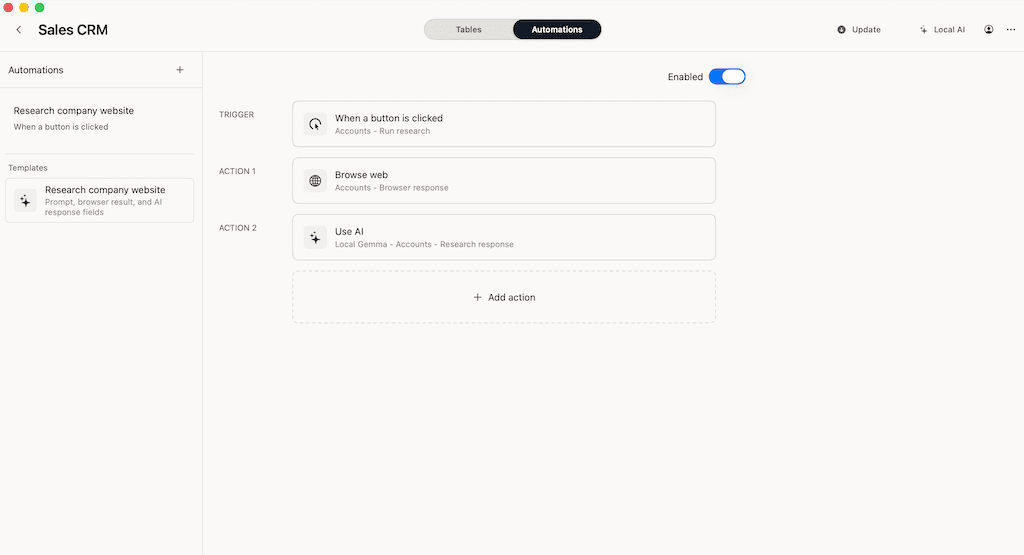
- Add row actions for repeatable tasks after the manual workflow is clear.
For the broader category, read Spreadsheet Database for Mac. For privacy tradeoffs, read Private Airtable Alternative. For the app-choice overview, read Database App for Mac.
When Macrows is not the right research database
Use Zotero when your main job is managing citations, bibliographies, PDFs, and word processor references. A spreadsheet database can track sources, but it should not replace a dedicated citation manager when citation output is the main deliverable.
Use DEVONthink when the research database is mostly a document archive. If the hard part is storing, searching, tagging, indexing, and exporting thousands of files, a document manager is the stronger fit.
Use Airtable when the research base is shared by default and needs forms, interfaces, permissions, team views, and cloud automation. Airtable is also a better fit when several people need the same live database in a browser.
Use an approved institutional tool when the work involves human-subject research, clinical data, regulated data, or formal retention requirements. Macrows is not a compliance promise.
Use a SQL database when the research is part of a technical data pipeline, software product, or large analytical dataset.
Macrows is strongest when the work is private, Mac-native, table-first, and close to the spreadsheet you already wanted to fix.
Decision rule
Choose the research database by asking what needs to be true one month from now.
If you need perfect citations, start with Zotero. If you need a searchable file archive, start with DEVONthink. If you need a shared team base, start with Airtable. If you need a private Mac database for sources, notes, claims, tags, and follow-ups, start with Macrows.
Then keep the first version small. Build Sources, Notes, Claims, and Tasks. Add People and Organizations when names repeat. Add more structure only after the review process exposes a real need.
Try Macrows with one research workflow
If your research already lives in a spreadsheet, get Macrows for Mac and rebuild one table first. Import the starter Sources CSV, add Notes, then create a Claims table only when you need to track what each source supports.
Do not migrate every note at once. Move one active project, create the review views you use weekly, and keep your original files backed up while the new structure proves itself.
FAQ
What is the best research database for Mac?
The best research database for Mac depends on the job. Use Zotero for citations, DEVONthink for document archives, Airtable for shared cloud research bases, and Macrows for private table-first research workflows.
Can I use a spreadsheet as a research database?
Yes, use a spreadsheet for a simple source list. Move to a structured database when you need linked sources, controlled tags, claim tracking, confidence ratings, saved views, and follow-up tasks.
Is Macrows a Zotero alternative?
No. Zotero is better for citations, bibliographies, PDF metadata, and word processor integration. Macrows is better for structured research tables such as sources, claims, notes, people, organizations, and tasks.
Is Macrows good for private research notes?
Yes, Macrows is a good fit when private research notes need fields, views, links, status values, and follow-ups. Use a notes app when the work is mostly writing and does not need table structure.
What should a research database include?
A practical research database should include sources, notes, claims, people, organizations, tasks, tags, confidence levels, dates, source links, and saved views for review work.
When should I avoid Macrows for research?
Avoid Macrows when you need regulated study-data collection, advanced citation output, a large document archive, SQL queries, or a shared browser database with mature permissions.