The practical AI agents browser answer is this: use browser agents for narrow, reviewable website actions, then save the result as structured data. They are risky when they perform broad, unsupervised work with no source URL, approval step, or record of what changed.
Apple's June 8, 2026 announcement is a practical example. Passwords can use Apple Intelligence and Safari to sign in and upgrade eligible weak or compromised passwords, while Safari can monitor pages and create custom extensions from a description: Apple Newsroom.
For Macrows users, the important shift is not passwords alone. It is that the browser is becoming a place where AI can act, not just a place where people read.
What Apple announced on June 8
Apple's announcement grouped the browser changes under Safari and Passwords, and the practical theme is action inside websites.
First, Safari can organize open tabs into topics. If a user is researching a trip, Apple says Safari can group the travel tabs together and keep sorting new tabs as browsing continues.
Second, Notify Me lets Safari monitor a web page for changes. Apple gives examples such as product restocks and price drops. The user tells Safari what to watch, then Safari notifies the user when it detects the change.
Third, Describe an Extension lets a user describe a custom Safari extension. Apple's example is a toolbar button that saves and rates recipes from cooking sites.
The Passwords change is the strongest signal. Apple says Passwords can automatically fix eligible weak or compromised passwords with a tap by using Apple Intelligence and Safari to sign in and upgrade accounts.
Apple says these features are available for developer testing starting June 8, 2026, with user availability planned for fall 2026 on supported devices, languages, and regions.
Why Passwords matters more than a normal browser feature
A password change is not just a page summary. It is a website action with state.
The old Passwords flow was mostly advisory. Apple documents Passwords security recommendations for weak, reused, or leaked passwords, but the user still had to open the website, find the password settings, copy the old password when needed, generate a new one, submit the form, and confirm that Passwords saved the update: Apple Support.
The new flow moves part of that work into Safari. The browser can navigate, sign in, and update the account to a strong password. That means the browser is no longer only showing the website. It is participating in the workflow.
That distinction matters for every AI agent in the browser. Reading is low risk. Acting is different. When an agent changes a password, submits a form, books a ticket, saves a record, or updates an account setting, the browser has crossed from information into operation.
Websites are becoming action surfaces
Browsers used to be reading surfaces. You searched, clicked, read, copied, pasted, and moved the result somewhere else.
AI agents change that shape. The browser can become an action surface: a place where software reads the page, reasons about the current state, clicks buttons, fills forms, watches for changes, and reports the result.
That is already the pattern behind browser agents. OpenAI introduced Operator in 2025 as an agent that could use its own browser to type, click, scroll, and complete web tasks from a user's instruction: OpenAI Operator. OpenAI's Computer-Using Agent research described the same broad idea: a model can work from screenshots, mouse actions, and keyboard actions instead of waiting for every website to expose an API: Computer-Using Agent.
Apple's Passwords feature is narrower than a general browser agent, and that is the point. It handles one specific job with a clear user benefit, a clear permission moment, and a clear destination: the saved password record.
That is the better model for everyday Mac work. Browser agents become useful when the job is narrow, reviewable, and attached to a record.
What this means for Safari extensions
Safari extensions used to mean installed add-ons: blockers, clippers, password helpers, readers, shopping tools, and developer utilities. The new Safari direction keeps that model, but adds a described layer.
Describe an Extension matters because it turns a browser helper into something the user can request in plain language. The user does not start with a developer, a manifest file, or extension settings. The user starts with a repeatable browser job.
For Macrows users, that opens a useful pattern:
| Browser job | What the extension or agent does | What should become structured data |
|---|---|---|
| Save a source | Capture title, URL, author, date, and selected note. | Source, topic, evidence, confidence, date checked. |
| Compare vendors | Read price, stock, lead time, and shipping notes. | Vendor, product, price, availability, last checked. |
| Watch a page | Monitor restocks, price drops, policy changes, or new posts. | Watched page, rule, last change, action needed. |
| Update a record | Push a status, note, or follow-up back into the right place. | Record ID, field changed, old value, new value, date. |
| Prepare a follow-up | Draft a reply or next step from the page context. | Contact, source URL, suggested message, next action. |
Read the broader setup in Safari Extensions: What Changed and What Mac Users Should Do. The short version is simple: keep browser tools close to browser work, then move durable facts into a private Mac database.
The Macrows angle: browser agents need structured data
The next useful browser agent should not only browse. It should extract, compare, monitor, and update structured data.
That is the Macrows angle. A browser agent can help with the moment: the page, form, account, source, vendor, lead, or price. Macrows helps keep the result in rows and fields that can be sorted, filtered, linked, reviewed, and acted on later.
For example, a browser agent may notice that a supplier changed a price. That is helpful, but not enough. The useful record needs product, vendor, old price, new price, date seen, stock note, source URL, owner, and next action.
The same applies to lead research. A browser agent may pull company names from a directory, read pricing pages, and find contact pages. The durable work is the table: company, website, category, status, source, last checked, next follow-up, and confidence.
Without that structure, browser agents produce more tabs, more notes, and more one-off answers. With structure, they become part of a working system.
A practical browser-agent table for Mac users
If you are testing AI agents in the browser, start with a table before you start with automation.
| Field | Why it matters |
|---|---|
| Website | Keeps the action tied to the right domain. |
| Source URL | Makes every captured fact traceable. |
| Agent job | Names the action: extract, compare, monitor, update, or draft. |
| Permission needed | Marks whether the job can read only, suggest, or change data. |
| Last checked | Shows when the page was last reviewed. |
| Result | Stores the useful outcome in a short field, not a chat transcript. |
| Confidence | Lets the user mark uncertain extraction or comparison work. |
| Next action | Turns the browser result into work someone can finish. |
That table can support several views:
- Needs review: agent output with low confidence or missing fields.
- Changed pages: watched pages where price, stock, policy, or copy changed.
- Follow up today: leads, clients, vendors, or sources with a due action.
- Safe to automate: repeatable actions that have been reviewed enough times.
- Do not automate: websites or workflows that need manual control.
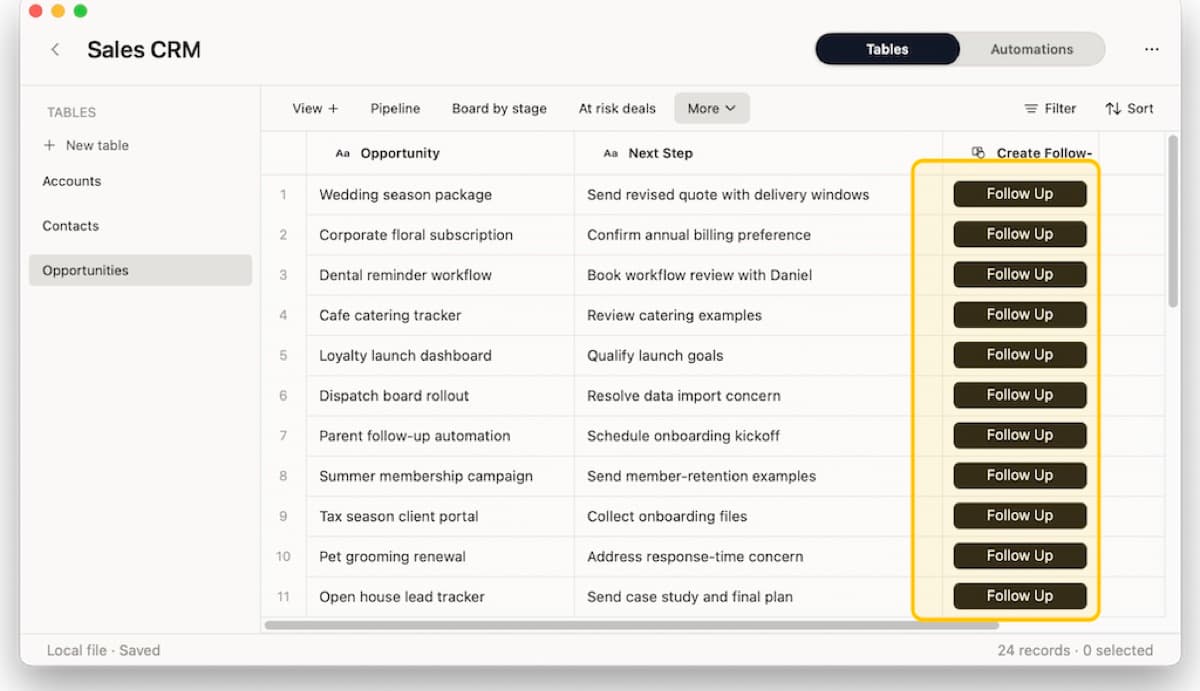
This is where Macrows is a better home than a pile of tabs. The browser can help gather. The table should keep state.
Guardrails before letting a browser agent act
Browser agents need stricter rules than ordinary page readers. Use this checklist before trusting one with work data.
- Separate read-only tasks from write actions.
- Require approval before any login, purchase, message, password change, or account update.
- Keep source URLs and change notes.
- Avoid sensitive client, finance, health, legal, or credential-heavy work unless the tool is built for that risk.
- Use stable records and fields instead of asking the agent to guess from visible row order.
- Review the first few runs by hand.
- Keep a field for confidence, status, and next action.
- Prefer narrow jobs over broad "do my browser work" prompts.
The web already has some structure for narrow actions. For password changes, the W3C working draft for /.well-known/change-password defines a discoverable URL that can point clients to the right password-change page: W3C Change Password URL. That kind of convention matters because agents should not have to guess their way through every website setting screen.
The same principle should apply to operational data. Agents work better when websites, apps, and local databases expose clear fields, actions, and review steps.
How Macrows fits
Macrows is a private spreadsheet database for Mac. It is useful when browser work produces data you need to keep, compare, update, and act on later.
Use Macrows when an AI agent in the browser helps you build:
- A lead table from company pages, directories, pricing pages, and contact pages.
- A vendor tracker with product pages, stock status, prices, terms, and last checked dates.
- A research database with sources, claims, evidence, confidence, tags, and notes.
- A competitor tracker with page changes, feature notes, price changes, and impact.
- A client follow-up table with source links, requests, owners, reply status, and next action.
The clean split is:
- Use Safari, Passwords, and Safari extensions for browser-side action.
- Use Siri AI or another assistant for questions and drafts.
- Use Macrows for records, fields, saved views, linked context, and row actions.
For the broader private database setup, read Spreadsheet Database for Mac. If you want the Mac browser side first, read Safari Extensions.
If browser research already runs part of your work, download Macrows and start with one table: source URL, status, date checked, confidence, result, and next action.
When Macrows is not the best fit
Use another tool when the browser action belongs entirely inside a dedicated app. Password changes belong in Passwords. A one-time calendar event belongs in Calendar. A saved article can stay in a read-later app if it does not need follow-up.
Use another tool when many people need live shared browser automation, centralized monitoring that runs while your Mac is off, external forms, or admin controls today.
Use another tool when the action is high risk and the review path is unclear. Banking, legal filings, medical portals, tax accounts, and credential-heavy admin pages need stricter controls than normal research work.
Macrows fits the structured table after the browser step. It is not a replacement for Safari, Apple Passwords, Safari extensions, or a dedicated security tool.
FAQ
What are AI agents in the browser?
AI agents in the browser are tools that can use web pages on a user's behalf. They may read pages, click buttons, fill forms, monitor changes, or update account settings.
What did Apple Passwords announce at WWDC 2026?
Apple said Passwords can automatically fix eligible weak or compromised passwords with a tap by using Apple Intelligence and Safari to sign in and upgrade accounts to strong passwords.
Does this mean Apple is letting AI act inside websites?
Yes, in a narrow and controlled way. The Passwords feature is evidence that Apple is letting AI use Safari to take website actions for a specific security job.
How are Safari extensions related to browser agents?
Safari extensions are browser-side helpers. Apple's Describe an Extension feature points to a future where users can describe a repeatable browser job and have Safari create a custom helper for it.
Why do browser agents need structured data?
Browser agents can read and act on pages, but business work needs durable records. Source URLs, status fields, dates, owners, confidence, and next actions make the result useful after the browser task ends.
How should Macrows users think about AI agents browser work?
Use the browser agent for the page action. Use Macrows for the table that remembers what changed, what was extracted, what needs review, and what should happen next.