The safest way to use Safari extensions for work is to keep them narrow: capture, block, read, monitor, or hand off a page, then store durable facts somewhere you can review. The practical 2026 shift is that Apple is making Safari extension work easier to build and distribute, while Safari itself is gaining AI-assisted page monitoring and custom-extension features.
That distinction matters if your work starts in the browser. A saved page, watched product, lead source, pricing change, or research note is useful for a moment. It becomes real work only when it has a status, source URL, date checked, owner, next action, and place to review it later.
What Safari extensions do
Safari extensions customize the way Safari works. Apple says extensions can display helpful page information, block website content, connect Safari to features from other apps, change page appearance, and more: Apple Support: Use Safari extensions on your Mac.
For a working Mac setup, most useful extensions fit one of these jobs:
- Block ads, trackers, cookie prompts, or distracting page elements.
- Save pages, tabs, links, clips, screenshots, or notes for later review.
- Improve reading, translation, grammar, dark mode, or accessibility.
- Connect Safari to a writing, task, password, note, or research app.
- Watch a page, product listing, pricing page, or source page for a change.
The mistake is installing extensions by category instead of by job. A small trusted set is usually better than a crowded toolbar. If an extension does not remove a real step from your browser work, it probably should not have access to your browsing.
What changed after WWDC26
Apple's current Safari extension story has two parts: developer plumbing and user-facing browser intelligence.
On the developer side, Apple's Safari Extensions page says Safari supports the WebExtension API, lets developers bring extensions from other browsers to Safari, distributes extensions through the App Store, and now lets developers package a web extension through App Store Connect without using a Mac or Xcode: Apple Developer: Safari extensions. That does not guarantee every Chrome extension appears in Safari, but it lowers the cost of supporting Safari.
WebKit also added extension-specific improvements in Safari 27 beta. The WebKit team says Safari 27 beta supports runtime.getDocumentId(), reports uncaught JavaScript exceptions and unhandled promise rejections in extension scripts, and propagates user gestures through common messaging APIs so extensions can complete actions that require user activation: WebKit: Safari 27 beta.
On the user side, Apple announced three Safari-adjacent features that matter to workflow users:
| Change | What Apple says | What Mac users should do |
|---|---|---|
| Tab topics | Safari can automatically group related tabs into topics. | Use it to reduce research clutter, but still save important sources elsewhere. |
| Notify Me | Safari can monitor a page for changes such as restocks or price drops. | Treat the notification as a trigger to update a record, not the record itself. |
| Describe an Extension | Users can describe a custom Safari extension, and Safari can generate it in the toolbar. | Use it for narrow page actions with reviewable output. Do not treat it as a database. |
Apple's Apple Intelligence page describes tab grouping, Notify Me, and custom Safari actions in one Safari productivity section: Apple Intelligence and Siri. Apple's WWDC26 announcement gives the concrete examples: Notify Me can monitor a page for changes, and Describe an Extension can create a custom Safari extension from a description, such as a recipe-saving toolbar button: Apple Newsroom.
The useful conclusion is not "install more extensions." It is that Safari is becoming a more active place to gather, monitor, and reshape web information. The storage and review layer still needs to live somewhere else when the work matters.
How to choose the right extension job
Start with the workflow you repeat, then choose the smallest browser helper that removes a real step.
| Workflow | Extension job | Table to keep outside Safari |
|---|---|---|
| Lead research | Save company pages, directories, pricing pages, and contact pages. | Leads, Companies, Contacts, Follow-ups |
| Content research | Clip articles, quotes, source pages, and reference links. | Sources, Notes, Claims, Drafts |
| Inventory watching | Watch supplier pages, availability, price changes, and reorder signals. | Products, Vendors, Stock checks, Purchase notes |
| Competitive tracking | Capture changelogs, pricing pages, feature notes, and screenshots. | Competitors, Features, Prices, Changes |
| Client work | Save tickets, briefs, examples, approval links, and invoice pages. | Clients, Projects, Assets, Next actions |
| Browsing cleanup | Block distracting content, cookie nags, or pages that slow down research. | No table needed unless the page creates a follow-up. |
The browser helper should do one browser job well. The table should keep the state of the work.
A Safari-to-Macrows workflow for research
A good Safari extension workflow has a short path from page to record:
- Capture the page, source URL, clip, screenshot, or change notification in Safari.
- Move only the useful facts into a structured table.
- Add fields for status, source URL, date checked, owner, next action, and notes.
- Use saved views for "needs review," "follow up today," "price changed," or "waiting on reply."
- Add row actions only after the same follow-up repeats.
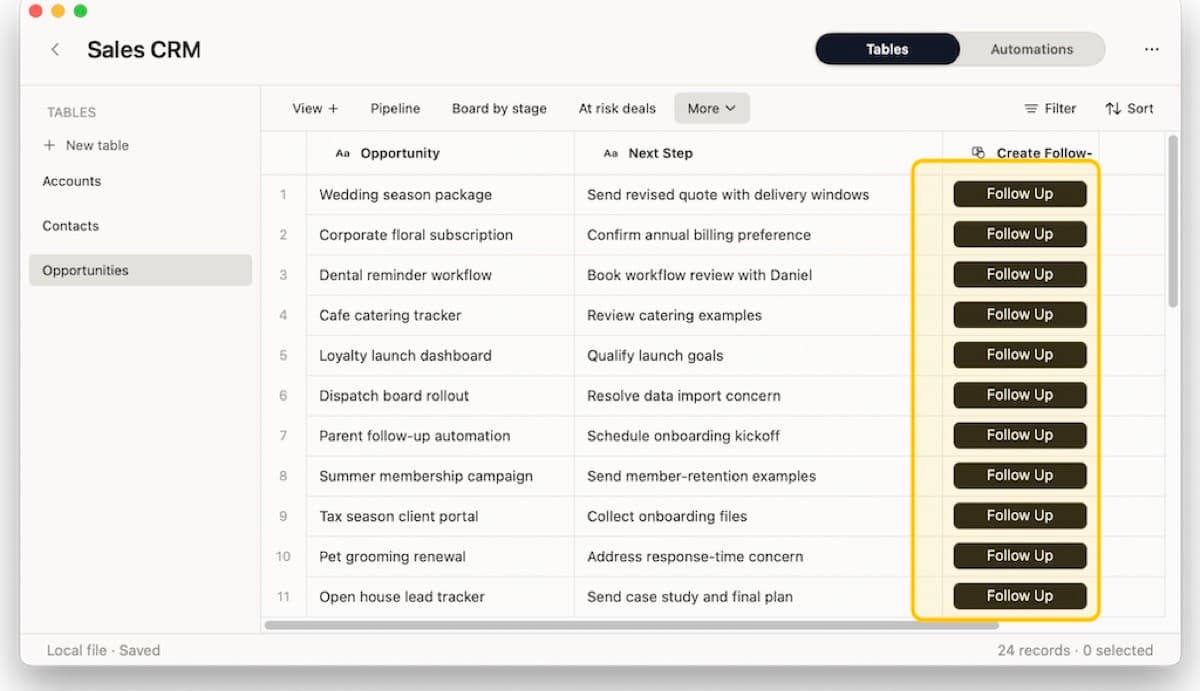
Here is the minimum table shape for browser research:
| Field | Why it belongs in the table |
|---|---|
| Source URL | Keeps the original page attached to the record. |
| Source type | Separates lead page, supplier page, article, ticket, changelog, or product page. |
| Status | Shows whether the item is new, reviewed, waiting, changed, or archived. |
| Date checked | Makes stale browser information visible. |
| Owner | Gives the follow-up a person, even if that person is only you. |
| Next action | Turns the captured page into work that can be finished. |
| Notes or summary | Keeps the relevant fact without forcing you to reread the page. |
This is where Safari extensions and Macrows fit together. Safari handles the page. Macrows keeps the working system.
Permissions checklist before installing
Apple says App Store Safari extensions are reviewed, signed, hosted by Apple, and kept up to date automatically, but permissions still matter: Apple Support. The same support page explains that extensions for new Safari profiles are turned off by default, and that extensions needing website access are off by default in private windows on macOS Sonoma 14 or later.
Use this checklist before installing an extension on a work browser:
- Install from the App Store unless you have a specific reason not to.
- Check whether the extension needs all websites or only a small set of sites.
- Prefer extensions that work on specific sites instead of every page you visit.
- Keep personal and work browsing in separate Safari profiles when the extension mix differs.
- Avoid untrusted extensions on client, finance, health, legal, password, and account pages.
- Remove extensions you have not used in the last month.
- Recheck extension permissions after major Safari or macOS updates.
If an extension asks for broad website access but only helps once a week, do not install it in your main work profile. Use a separate Safari profile, a dedicated browser, or a manual copy-paste step instead.
How Macrows fits
Macrows is a private spreadsheet database for Mac. It fits when Safari is where the work starts, but not where the work should live.
Use Macrows when browser work becomes:
- A lead list with company, source URL, status, last checked, and next follow-up.
- A research database with source, claim, evidence, confidence, tags, and notes.
- A competitor tracker with product, pricing page, feature, date seen, and impact.
- A supplier watchlist with product, vendor, availability, price, reorder point, and owner.
- A client project table with links, examples, approvals, and next actions.
Safari extensions can help you find, block, clip, save, monitor, or reshape the page. Macrows helps you turn that page into a record you can sort, filter, link, review, and act on.
For broader setup ideas, read Research Database for Mac, Spreadsheet Database for Mac, and AI Agents Browser: Apple Passwords Can Now Act on Websites.
If browser research already runs part of your work, download Macrows and start with one table: source URL, status, date checked, owner, summary, and next action.
When Macrows is not the right fit
Use another tool when the browser action belongs entirely inside a dedicated app. A password manager extension should stay connected to the password manager. A read-later extension can stay in the read-later app if all you need is a reading queue. A dedicated commerce tracker may be better if it already connects to stores, alerts, and purchase history.
Use another tool when the workflow needs real-time shared browser automation for a team, customer-facing forms, admin controls, or monitoring that runs while your Mac is off.
Macrows fits the structured table after the browser step. It is not a replacement for Safari, an extension store, a password manager, a read-later app, or a web monitoring service.
FAQ
What are Safari extensions?
Safari extensions are add-ons that give Safari extra functions, such as blocking content, saving links, managing tabs, improving reading, or connecting the browser to another app.
Are Safari extensions available on iPhone and iPad?
Yes, Safari extensions can be available on Mac, iPhone, and iPad when the developer supports those devices. Apple's developer page says Safari extensions can target iPhone, iPad, and Mac, and Apple's support page explains how installed extensions can be shared across devices.
What changed with Safari extensions in 2026?
The useful 2026 changes are easier extension packaging, Safari 27 beta Web Extension improvements, and Apple Intelligence features that make Safari more active: tab grouping, Notify Me page monitoring, and Describe an Extension.
Should Mac users install Safari extensions for work?
Yes, when the extension has a clear browser job and reasonable access. Use extensions for capture, blocking, reading, monitoring, or app handoff; skip them when the permission request is broader than the value.
Can a Safari extension replace a research database?
No. A Safari extension can capture or improve a page, but it does not replace a structured table with source URLs, tags, status, notes, linked records, and next actions.
How do I use Safari extensions safely?
Install fewer extensions, prefer the App Store, restrict website access where possible, separate work and personal browsing with profiles, and remove extensions you no longer use.