The best Airtable alternative for Mac depends on where the work should live. Choose Airtable when you need a shared cloud app for a team; choose a Mac-native spreadsheet database when the work should start private, local, and fast on your Mac.
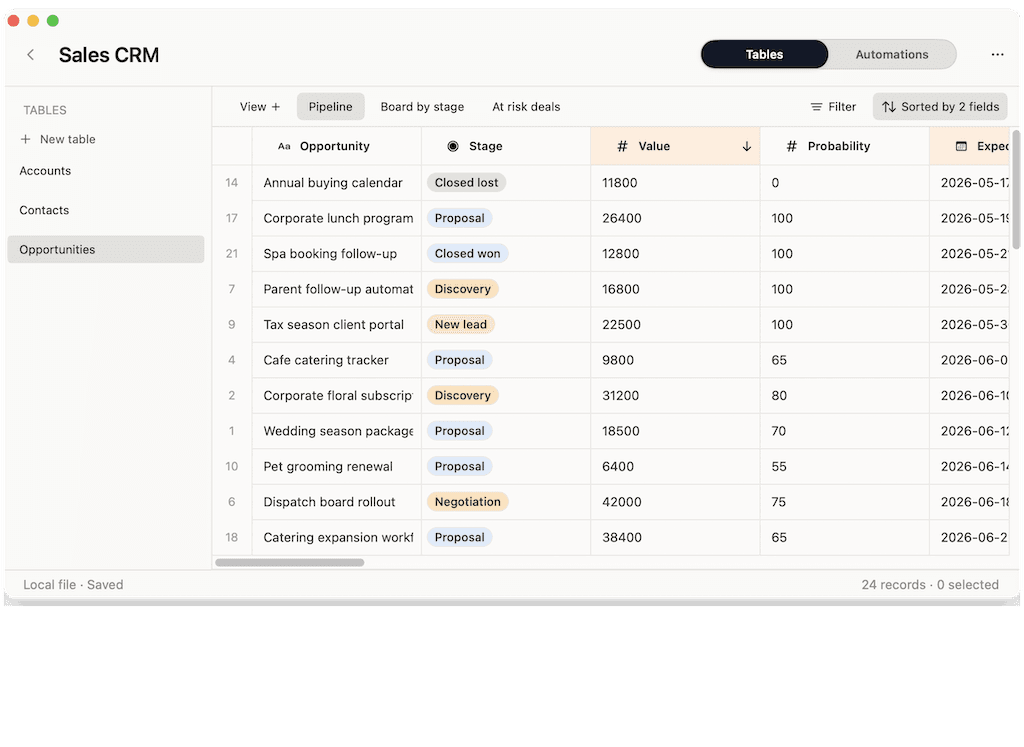
Macrows is built for that second case. It gives Mac users a familiar grid with fields, saved views, linked records, formulas, CSV import, lightweight Excel export, row actions, and local AI cleanup, without making every small workflow start in a browser workspace.
What Airtable does well
Airtable is a strong choice when the work belongs in a shared cloud base. Its own docs describe workspaces, bases, tables, records, fields, views, collaborators, and permissions across web, Mac app, and Windows app access: Airtable basics.
That model makes sense for team operations. Airtable supports many view types, including grid, form, gallery, timeline, Gantt, Kanban, and calendar views. It also has collaborators and permissions, so different people can work from the same base with different access levels.
Airtable also presents itself as a connected app-building product for shared data, custom apps, automations, interfaces, integrations, and enterprise controls: What is Airtable?. If your real need is a team app with forms, portals, reporting, and live shared data, Airtable may be the right tool.
Why Mac users look for an alternative
Mac users usually look for an Airtable alternative for Mac for one of five reasons.
- The work is private before it is shared. Client notes, research sources, leads, inventory drafts, and early project plans do not always need to begin in a cloud base.
- The browser is the wrong home for daily work. Some people want a native Mac window, local files, keyboard-friendly editing, and a calmer working surface.
- The team model is too much setup. A solo consultant may not want workspaces, collaborators, permissions, and billing before a client list is tidy.
- Per-seat pricing changes the feel of a small workflow. Airtable's pricing page says Team is $20 per user per month when billed annually and Business is $45 per user per month when billed annually: Airtable pricing.
- Offline and export needs are not the same as cloud access. Airtable says offline access is not supported and points users to CSV exports or API backups for offline copies: Airtable technical requirements.
None of those points make Airtable weak. They describe a mismatch. Airtable is often best when collaboration is the main job. Mac users searching for an alternative often need structure first, collaboration later.
Airtable for Mac vs Mac database software
Airtable for Mac can mean the Airtable desktop app, but many searches are really about where a Mac workflow should live. If the work is shared by default, Airtable's cloud base model is usually the cleaner answer. If the work starts as a private spreadsheet on one Mac, Mac database software may fit better.
Use Database Software for Mac when you are still choosing the broader category. Use this guide when the specific decision is Airtable versus a Mac-native spreadsheet database.
What a good Mac Airtable alternative should include
A good Mac Airtable alternative should keep the part people like about Airtable: tables that feel approachable, fields that reduce messy data, and views that make records easier to work with.
It should also respect the reasons someone wants a Mac app in the first place.
| Feature | Why it matters on Mac |
|---|---|
| Native Mac app | Daily CRM, project, inventory, and research work should not require a browser tab by default. |
| No-login local use | A private working database should be useful before accounts, workspaces, or billing enter the picture. |
| Real field types | Selects, dates, numbers, links, formulas, and buttons make data more reliable than loose cells. |
| Saved views | One table can show follow-ups, overdue work, low stock, blocked tasks, or warm leads. |
| Linked records | Contacts can connect to companies, tasks to projects, and products to vendors. |
| Import and export | Spreadsheet work starts in CSV, Excel, Google Sheets, or old files, so exits matter. |
| Row actions | Repeated work should sit near the record: draft follow-up, update status, clean lead data, create next task. |
| Honest collaboration path | Sharing should be available when needed, without making shared cloud work the default for every project. |
Airtable's linked-record docs are a useful reference for this category. Airtable recommends separating related lists into tables, then connecting them with linked records: Airtable linked records. That same mental model is valuable even when the workflow starts as a private Mac database.
Airtable vs Macrows vs spreadsheets
| Need | Airtable | Macrows | Google Sheets, Excel, or Numbers |
|---|---|---|---|
| Shared browser collaboration | Strong | Not the main reason to choose it today | Strong in Google Sheets; varies in desktop spreadsheet apps |
| Native Mac workflow | Has a Mac app, but the model remains account and workspace based | Core fit | Strong for normal spreadsheet documents |
| Private local starting point | Not the default model | Core fit for local projects | Strong, but with less database structure |
| Real field types | Strong | Core fit | Limited compared with a database-style tool |
| Linked records | Strong | Core fit | Fragile across tabs |
| Row actions and local AI cleanup | Airtable has cloud AI and automation features | Built into Macrows' row-action direction | Usually separate tools or scripts |
| Pricing feel for solo work | Free plan exists; paid growth is per collaborator | Free local use | Depends on the app or suite |
The cleanest rule is simple: use Airtable when the database is shared by default. Use Macrows when the first copy should stay private on your Mac.
For a deeper side-by-side comparison, read Airtable vs Macrows. For the broader category behind Macrows, read Spreadsheet Database for Mac. For the top-level Mac database software decision, read Database Software for Mac.
Example workflows for a Mac Airtable alternative
A Mac-native Airtable alternative is most useful when a spreadsheet has become a working system.
| Workflow | Tables | Views | Row actions |
|---|---|---|---|
| Personal CRM | Contacts, Companies, Deals, Activities | Follow up today, warm leads, inactive clients | Draft follow-up, create next task |
| Project tracker | Projects, Tasks, People, Milestones | Overdue, blocked, launching this month | Move status, create handoff note |
| Inventory | Products, Vendors, Locations, Stock Changes | Low stock, incoming, discontinued | Mark reorder, log stock change |
| Research database | Sources, Notes, Tags, People | Needs review, by topic, cited | Summarize notes, clean source fields |
| Content calendar | Content, Campaigns, Clients, Assets | Drafting, awaiting approval, publishing soon | Create next draft task, update status |
These examples do not require a full internal app on day one. They need records, fields, views, and actions close to the grid. That is the missing middle between a plain spreadsheet and a shared cloud workspace.
Migration checklist from Airtable to Macrows
Do not migrate every Airtable base at once. Move the private work first.
- Pick one workflow that is mostly yours: a client tracker, lead list, research base, inventory draft, or personal project tracker.
- Identify the core tables. Contacts, Companies, Deals, and Activities are separate tables, not four copies of one list.
- Export the relevant Airtable views to CSV. Airtable's view docs explain that CSV export is available from web and desktop apps, and each table needs its own export: Airtable views and CSV export.
- Import the CSV into Macrows and recreate only the fields that matter: status, owner, date, select fields, formulas, and links.
- Rebuild saved views around decisions: follow up today, overdue, low stock, blocked, closing this month.
- Add row actions only where they remove repeated work.
- Keep Airtable for the bases that still need forms, interfaces, permissions, many collaborators, and cloud automations.
CSV is a bridge, not a full copy of an Airtable base. Airtable's technical requirements page notes that offline exports do not include record comments, extension content, field descriptions, or base guide content. Plan the migration around the working data, not a perfect clone.
How Macrows fits
Macrows is a private spreadsheet database for Mac. It is for Mac-based solo operators and small teams who have outgrown a normal spreadsheet, but do not want every workflow to start as a cloud app.
Use Macrows when you want to:
- Build a CRM, project tracker, inventory list, research database, or content calendar from a familiar grid.
- Keep local projects private on your Mac before deciding what needs sharing.
- Add fields, saved views, linked records, formulas, buttons, and row actions as the workflow becomes more important.
- Import CSV or simple Excel data and keep a practical export path open.
- Use local AI cleanup from the row or table where the work already sits.
Macrows is not trying to be a full Airtable clone. It is a better fit for the private Mac side of the same spreadsheet-database problem.
For offline-sensitive Airtable work, read Can Airtable Work Offline?. If the Mac-first workflow is your fit, download Macrows and start with one real spreadsheet that already runs part of your work.
When Airtable is still the better choice
Use Airtable when the database is shared by default. Airtable is better when you need mature collaboration, forms, interfaces, portals, permissions, sync, reporting, cloud automations, integrations, scripts, and admin controls today.
Use Airtable when people across Mac, Windows, mobile, and browser need the same source of truth. Use it when the cost of a per-seat workspace is justified by shared access and central control.
Use Google Sheets when live spreadsheet collaboration is the main job. Use Excel when the work depends on advanced spreadsheet modeling, pivots, formulas, or existing Microsoft files. Use Numbers when you want a polished Apple spreadsheet document and do not need linked records or row actions.
Macrows is the wrong choice if the workflow needs a mature shared portal, enterprise admin controls, a mobile-first field data app, or a full SQL database client.
Decision rule
Choose based on the first copy of the work.
If the first copy should live in a shared cloud base, choose Airtable. If the first copy should live privately on your Mac, choose Macrows.
Ask these questions before you switch:
- Is this workflow personal, sensitive, or still experimental?
- Do I need many collaborators today, or only later?
- Would a browser workspace make the work clearer or heavier?
- Do I need forms and interfaces, or mainly a reliable grid with structure?
- Should this data start local before it is shared?
- Can I keep Airtable for shared bases and move only private workflows to Macrows?
Most Mac users do not need one winner for every workflow. They need the right home for each one.
FAQ
What is the best Airtable alternative for Mac?
The best Airtable alternative for Mac depends on the workflow. Macrows fits private Mac-native spreadsheet databases. Airtable fits shared cloud apps. Google Sheets, Excel, and Numbers still fit normal spreadsheet work.
Is there a native Mac app like Airtable?
Macrows is built as a native Mac app for spreadsheet-database workflows. Airtable also offers a Mac app download, but Airtable's model is still based on accounts, workspaces, cloud data, and shared collaboration.
Why choose Macrows instead of Airtable?
Choose Macrows when the work should start private on your Mac and needs a grid, fields, saved views, linked records, formulas, imports, exports, row actions, and local AI cleanup.
Why choose Airtable instead of Macrows?
Choose Airtable when the workflow needs many collaborators, browser access, forms, interfaces, portals, mature permissions, cloud automations, integrations, and admin controls today.
Can I move from Airtable to Macrows?
Yes, for the private parts of your workflow. Export relevant Airtable tables or views to CSV, import them into Macrows, then rebuild the fields, views, links, and row actions you still need.
Does Macrows replace Google Sheets or Excel?
Not for every spreadsheet. Use Google Sheets or Excel for collaborative spreadsheets, financial models, analysis, charts, and existing workbook-heavy processes. Use Macrows when the spreadsheet has become a private database workflow.