Can Airtable work offline? No. Airtable does not support offline access. Airtable's technical requirements require internet access for browser, Mac, Windows, iOS, and Android use, and its FAQ says offline access is not supported.
Use Airtable when the workflow needs a shared cloud base. Use a local Mac database when the first working copy should stay private on your Mac and you still need fields, views, links, formulas, and row actions.
This article owns the offline question only. For the broader product comparison, read Macrows vs Airtable or Airtable Alternative for Mac.
What offline really means for Airtable
"Offline Airtable" can mean several different jobs. Naming the job first prevents the common mistake: treating a CSV backup like a working database.
| Offline need | What Airtable gives you | Better next step |
|---|---|---|
| Read a saved copy | CSV export can help | Export the needed table or view |
| Edit records while disconnected | Not supported as Airtable offline access | Use a local app or wait until you reconnect |
| Keep fields, views, linked records, and formulas working | CSV does not preserve the full working base | Use a local database or spreadsheet database |
| Sync offline changes back later | Not supported as a normal offline mode | Use Airtable online or another tool built for sync |
| Keep the primary copy on your computer | Airtable is cloud-based SaaS | Start with a local Mac workflow |
If you only need a reference copy, export data. If the workflow must keep running, choose a tool where the working copy can live locally.
Why CSV export is only a snapshot
CSV export is useful because it is portable. You can open a CSV in Numbers, Excel, Google Sheets, Macrows, or another data tool. It is a good backup and migration format.
But CSV is flat. Airtable documents CSV download at the view level, not the base level, in its guide to creating and managing bases. Its views documentation says a full base cannot be exported as one file; each table needs its own CSV, and attachment files need separate handling: Airtable views FAQ.
That means a CSV export can miss the parts that make a base feel like a system:
- View filters, grouping, and working layouts.
- Interfaces, dashboards, and extension content.
- Record-level comments, field descriptions, and base guide content.
- Attachment files that need separate download or handling.
- Automations and permissions.
- The live relationships between tables that drive the workflow.
For a simple contact list, that may be fine. For a CRM, project tracker, research database, or inventory system, the missing context is often the actual workflow.
When Airtable is still the right choice
Airtable is strong when the work belongs in a shared cloud workspace. If your team needs browser access, live collaboration, forms, interfaces, admin controls, automations, and permissions across many people, Airtable is often the better fit.
This is especially true when the database is not personal anymore. A sales team pipeline, shared content operation, or cross-functional product tracker can benefit from one central cloud base because everyone needs the same source of truth.
Offline support is not the only buying criterion. If the workflow is collaborative by default, Airtable's cloud-first model may be exactly the point.
When a local Mac database is better
A local Mac database is better when the work should start private, fast, and owned by one person before it becomes a shared system.
That is common for:
- A personal CRM with clients, leads, notes, and follow-ups.
- A research database with sources, tags, notes, and sensitive material.
- A project tracker for a solo consultant or small Mac-heavy team.
- An inventory list with vendors, locations, stock status, and reorder notes.
- A content calendar that connects clients, campaigns, drafts, approvals, and publish dates.
- A lead list where imported CSV data needs cleanup before anything is shared.
These workflows often start in spreadsheets because a spreadsheet is fast and flexible. The problem appears when the sheet becomes important: rows become records, columns become fields, tabs become related tables, and manual edits become repeated workflow steps.
At that point, the answer is not always a larger cloud workspace. Sometimes the better answer is a private spreadsheet database on the Mac.
What this looks like in Macrows
A local alternative should still keep the grid visible. Structure should make the table more reliable without hiding the rows you need to review.
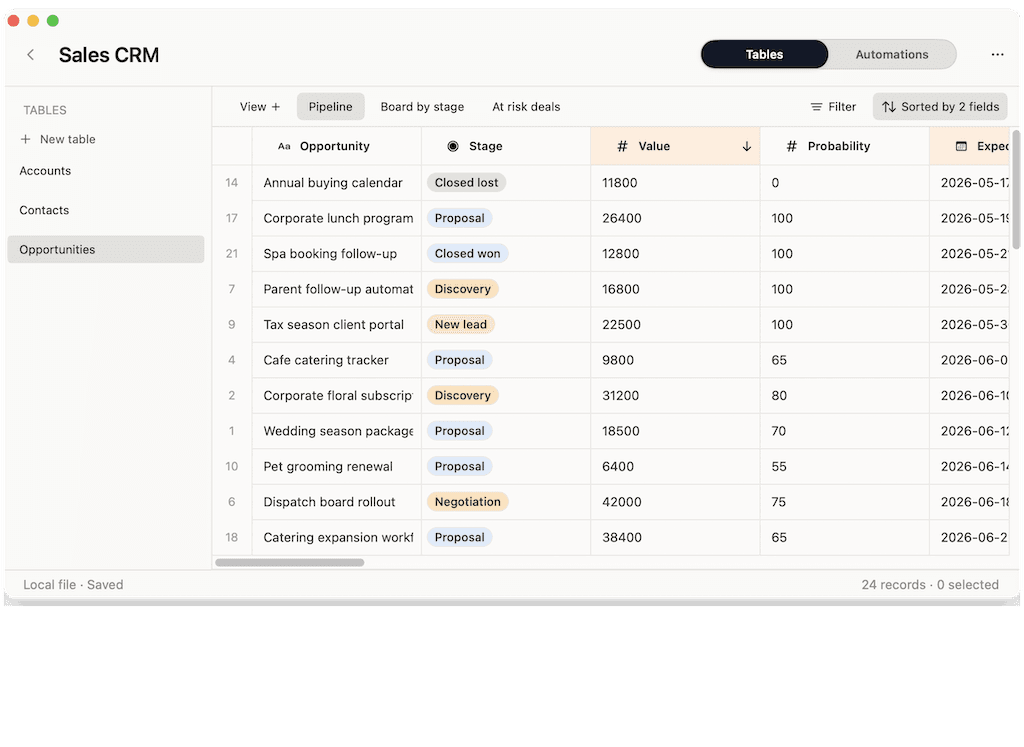
For offline-minded work, the visual test is simple: can you still see the records, clean the data, and decide what happens next without designing a full app first?
How Macrows fits this use case
Macrows is a private spreadsheet database for Mac. Local projects are stored on your Mac and are not uploaded to Macrows Cloud by default, according to the Macrows privacy page. The pricing page says local use is free and no account is needed for local projects.
That makes Macrows a good fit when your real question is not just "Can Airtable work offline?" but "Should this workflow be cloud-first at all?"
Use Macrows when you want to:
- Keep a private working database on your Mac.
- Import CSV or spreadsheet data and clean it in a familiar grid.
- Add fields, saved views, formulas, linked records, and row buttons.
- Work on client, research, or operational data before inviting anyone else.
- Move beyond a flat spreadsheet without turning the workflow into a browser workspace.
Use Airtable when you need mature cloud collaboration, shared interfaces, forms, always-on automations, team permissions, and enterprise controls today.
When Macrows is not the right fit
Macrows is not the right fit when the database must be shared by default across a team that lives in the browser. Airtable is better for public forms, interface-heavy workflows, permissioned team workspaces, and mature cloud automations.
Macrows also should not be treated as "Airtable with offline sync." A local Mac workflow is a different model. It is better when the first copy should stay local, not when many people need to edit the same cloud base from different devices.
Use a plain spreadsheet when you only need a simple list, budget, or analysis workbook. Use a full database or custom app builder when you need complex permissions, custom screens, and business logic beyond a working grid.
A decision checklist before you move
Use this checklist before choosing between Airtable, a CSV export, and a local Mac database.
- Would losing internet access stop you from doing the work?
- Do you need to edit records, or only read a saved copy?
- Does the workflow depend on linked records, views, formulas, comments, attachments, or automations?
- Is the first copy sensitive enough that you would rather keep it local?
- Are collaborators needed today, or only later?
- Would a cloud workspace add value, or just setup?
- Can you export the data you need without losing important context?
If the answers point toward live collaboration, use Airtable. If they point toward private work, start with a local tool and share only when the workflow actually needs it.
FAQ
Does Airtable support offline access?
No. Airtable does not support offline access. Its technical requirements list internet access for browser, desktop, and mobile use, and its FAQ says offline access is not supported.
Can I export Airtable data and use it offline?
Yes, for saved copies. Airtable supports CSV downloads from views and tables, but that gives you exported data, not a working offline Airtable base.
Do CSV exports preserve linked records and views?
No, not as a full working system. CSV files can include visible field values, but they do not preserve the live behavior of Airtable views, interfaces, automations, permissions, comments, or every part of base context.
What is the best Airtable offline alternative for Mac?
The best fit depends on whether you need cloud sync later. If you want a private Mac-first spreadsheet database with local projects, Macrows is designed for that use case.
Does Macrows replace Airtable?
Not always. Use Airtable for shared cloud workflows. Use Macrows for private CRMs, research databases, imported CSV cleanup, small trackers, and workflows that should not start in the cloud.